Stellic is your tool for planning your path to graduation.
Stellic helps you see where you are in your degree, what requirements you still need to complete, and how your future semesters could fit together.
Before you jump in, watch this quick 10-minute video. It’ll show you how to read your degree audit, use the Planner, and start mapping out your path to graduation.
When you log in to Stellic with your OU 4x4 and password you’ll land on your Dashboard. This is your main hub for checking your degree progress, planning future terms, viewing your schedule, and keeping your academic information in one place.
The following video explains how to access Stellic.
For more how to videos, visit the Stellic - The Degree Management Tool at OU YouTube channel.
From your Stellic Home Dashboard, you can quickly view key information such as your progress, plans, and upcoming tasks.
You can also view your full Degree Audit by selecting Track Progress from the left‑hand navigation menu or clicking See Progress in the Track Graduation Requirements box within the Quick Access section.
The Stellic Planner gives you a clear, organized way to map out future semesters and understand how your course choices support your path to graduation. It helps you plan ahead with confidence and stay aligned with your degree requirements.
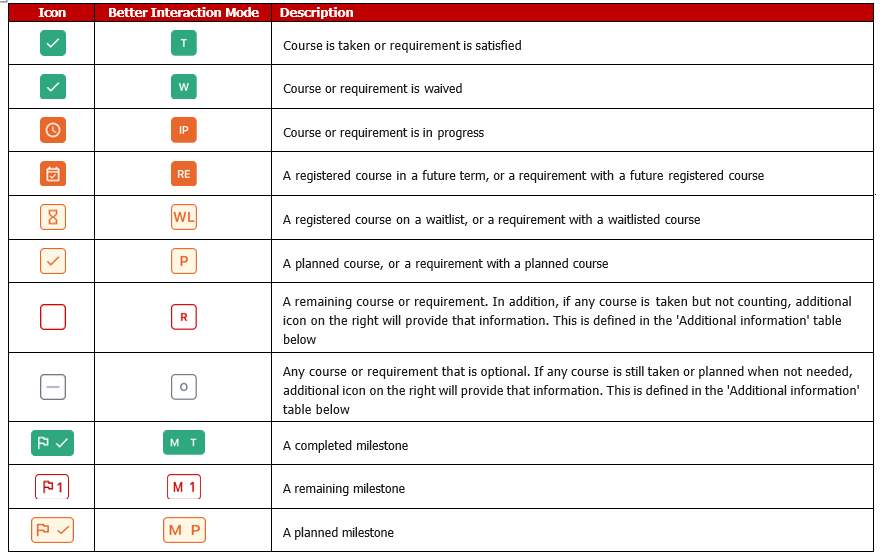
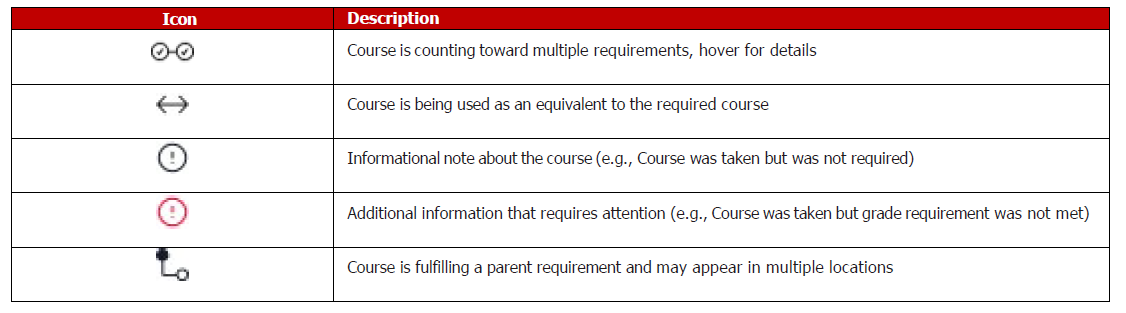
Use Track Progress in Stellic’s left menu to open your degree audit and quickly see what you’ve completed, what’s still required, and how your current or planned courses apply to your degree.
Your full degree audit with every requirement for your major, minor, or certificate. A clear view of completed, in‑progress, and remaining requirements. How your planned and registered courses apply across different requirements.